|
MINI HOME SERVER |
|||
|
|||
|
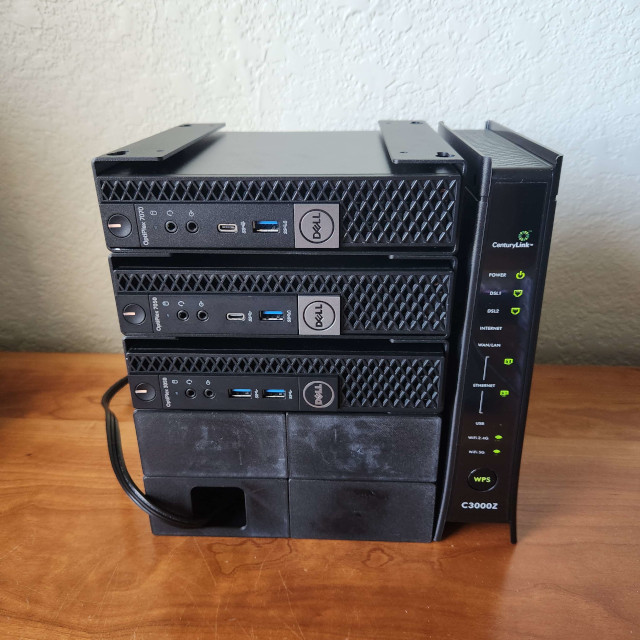
This is a miniature server that I built with small form factor computers.
Here's a quick overview of what it does and how it works.
|
|||
|
HARDWARE |
|||
|
|||
|
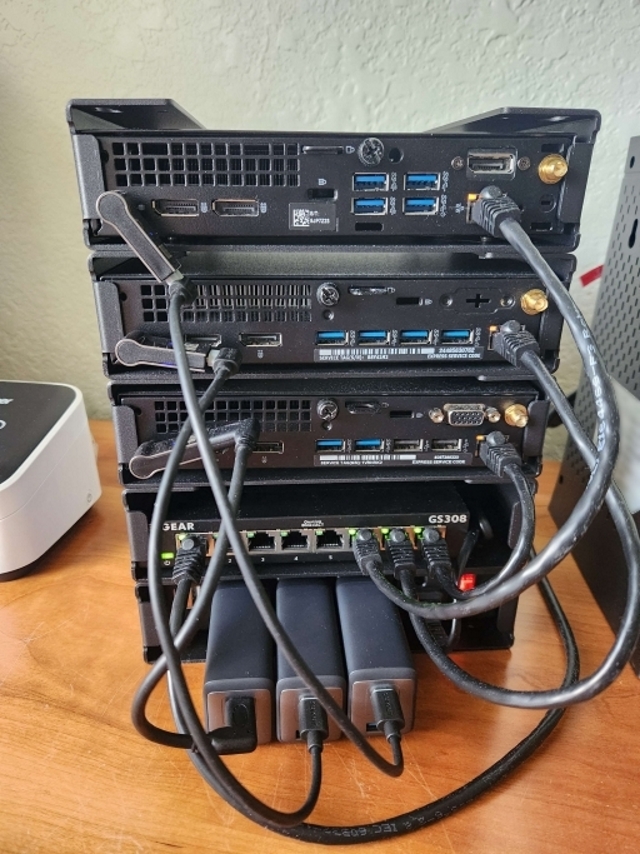
There are three Dell Optiplex Micros all linked together with a basic Netgear switch.
Each one of them serves a different purpose: storage, website, and management.
To house them together, I found SFF mounts with suitable mounting holes that could be screwed together, essentially forming a rack.
For the power supply, 65W Anker power bricks were used and each one is plugged into a power strip at the bottom rack unit. These are great as they are compact and easy to replace. However, since these Dell Optiplexes use 19.5V barrel jacks, they require an adapter to convert from USB PD. The front blanking panels were the only parts that I had to custom design and 3D print. In a real datacenter, they are used to isolate the airflow between the hot and cold aisles. For this purpose, they are just to make the rack look nice. I will leave a link to the CAD file along with links to the other parts at the bottom of this page. |
|||
|
SETUP |
|||
|
|||
|
For the operating system, I went with Debian.
There's nothing special about it.
I chose it simply because it's what I'm most familiar with.
Installing it was a breeze and Debian was able to detect the built-in ethernet adapters.
Since this was a headless server, I didn't even bother to install GPU drivers.
In order to make my server reachable, I also had to setup a domain resolution. A domain typically requires a static IP, but that can be expensive. When doing some research, I learned that most domain providers also support dynamic DNS (DDNS), meaning I don't actually need to have a static IP. Instead I could install a local client onto my server, such as ddclient, which would update the domain whenever the server's IP address changed. Getting ddclient to work with Cloudflare wasn't as straightforward as I hoped as the current release didn't support Cloudflare's API tokens. I ended having to recompile the latest build from source. But once I got that built and running, and after waiting anxiously for the DNS to propagate, I was finally able to ping the server! Now that I could resolve the domain, the next problem was my absurdly slow internet. I could only upload 3mbps, which is too slow even for serving static webpages (with pictures). To accomodate that issue, Cloudflare also offers free caching services. Without it, you would be waiting a long minute before you could read this article. For the web server, Nginx seemed like the right choice as I only cared about serving static pages. Learning how to setup Nginx was fairly trivial and I was able to load up a page within minutes. The only concern I had was figuring out how to setup https, but again, Cloudflare provided a solution to that problem too. It only took a simple toggle in my settings to enable https proxy. |
|||
|
CONCLUSION |
|||
| You may wonder why I didn't bother using a VPS for this. It's a good alternative, but where's the fun in that? It's comforting knowing that I can host a website from my own home. If something breaks, I won't need to go through the hoops of submitting a ticket and waiting for a technician to respond. More importantly, this was a good learning tool for me and I hope it was for you too! | |||
|
LINKS |
|||
|
Dell Optiplex 7070 Micro
Universal SFF Mount USB C to Dell Power Adapter HHSOET Power Strip Netgear GS308 Network Switch Anker Nano II 65W Charger 60W USB C Cable CAT5e Cable Custom Blanking Panel |